Today I upgrade netbook (Asus EeePC 1005HA) to the pre-release of Ubuntu 12.04, coming from months of using 11.10 happily, primarily gnome-shell, which I find better suited to my laptop needs - it's less invasive visually in terms of notifications, less cluttered in the top panel, and that's about all I care about when I use it for little more than taking notes in class and accessing the internet on the go. It sounds simple, but I like having the date and time top and centered as it is in gnome-shell.
However, I have been intrigued by this new HUD concept that debuts in Ubuntu precise pangolin. While I have passed the period of my life where I update every time something new comes along (I still am running 11.04 on my desktop and still sometimes wish I had stuck with 10.10) only to see something break or a feature change that I don't personally like, I nevertheless get itchy about major version upgrades, and what could be more major than the first LTS edition of your operating system in two years?
In some cases, I think that the transition from menu tree based navigation to a universal search model à la the HUD has some kinks to work out. The first thing that comes to mind is context. If you watch the video linked above, when the command to undo the glow in Inkscape, you see that the Ubuntu devs are touting easy discoverability of commands via the HUD, obviously in an attempt to woo any curmudgeons complaining about losing their precious menus. However, their choice to simply present commands as the tail item of a list of what used to be menu choices leaves much to be desired. Rather than go full on command-centric, Ubuntu is really just presenting menu trees in a new format.
Now, some will say that this improves context of commands, so that users can better intuit what the command should do, if it is an unfamiliar one. However, typing "undo" results in options for "undo glow" or "undo history." For the unfamiliar user, the differences between these commands might be hard to determine. In a menu tree, options and commands are presented in an intentional format, and even if we might quibble about whether "Preferences" should be under tools or edit, the placement doesn't change once we have learned it.
That brings me to my next point - learning curves. My immediate reaction to the Unity HUD was that it was a pointless change to a perfectly usable method of computing that everyone already understood. I thought of my experience switching from Microsoft Office 2003 (still the best suite, imo) to the completely redesigned ribbon interface of Office 2007.
I HATED IT.
After a good two years spent memorizing all of the keyboard shortcuts for the commands most relevant to me, everything was moved around the menus. Alt+I+N+N didn't give me a footnote anymore, and I wanted to cry.

Then I realized...a shift from menu tree based navigation of commands to a HUD-style approach would help avoid such problems. Rather than keyboard commands tied to a menu tree placement that changes at the whims of developers, a universal access point for commands would mean that [SuperKey] plus "foo" would give me access to insert a footnote every time.
Stop and think about that.
Application developers could update their programs without the fear of changing things too much, thereby allowing their time and resources to be devoted to the actual processes and content that the application is designed to deal with and not the presentation of commands and feature modalities. No more would you need to go a googling to figure out how to make Office 2007 look like your friendly pal Office 2003 by installing plugins from Switzerland. Users would not be faced with the unenviable choice between upgrading and losing their preferred interface or holding pat and losing out on advanced features and new compatibilities.
In spite of all the rabid anti-change bloggings of tech-conservative computer geeks, not everyone already understands the basic menu tree paradigm. Young computer newcomers are growing up tapping iPhones and not messing about going to File...New...Tab... in order to pull open a new webpage. And the reference to iOS is no mistake. Indeed, we can see that Apple made one-stop access via the keyboard a priority way back in 2004.
 |
| want to listen to Sandra...email her...stalk her on facebook? Apple spotlight has you covered |
 |
| RIM's blackberry 7 included universal search as one of the main new features |
 |
| Android of course had to get in on the fun |
 |
| popular tool GNOME-Do, itself inspire by quicksilver for mac, brought fast Do-ing via the keyboard to the masses |
 |
| and of course, iPhone is all about its spotlight |
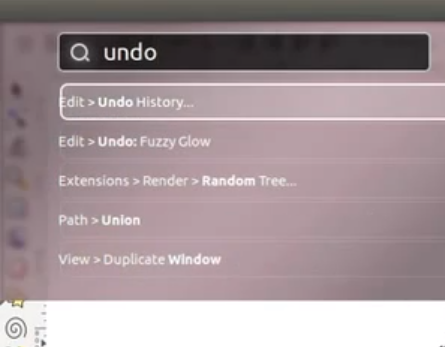 |
| Unity HUD...biting some style, no harm done |
Obviously, modern computing - at least for the content driven, app-tapping masses - is moving toward this paradigm. With several major players representing a huge swath of human-computer interactions converging on universal search, it only made sense for Ubuntu to do the same, and they have made an interesting first step with the HUD.
And they have not completely made an Ubuntu-purple version of Spotlight. In fact, if you look at each implementation I referenced above, there is one key commonality that the HUD does not share.
Spotlight, Blackberry's and Android's universal search, and the iPhone all focus on indexing and presenting content. The Unity HUD, rather, applies the universal search model to command access. While GNOME-Do also served as an application launcher and could perform basic application functions such as pause music in Rhythmbox and search Firefox bookmarks, all of GNOME-Do's functionality was plug-in dependent, and in no case could Do serve as a replacement for the menu-tree of commands.
The Unity HUD, however, is seeking to be at least a fully capably alternative, if not a replacement for traditional point-click menu computing. I am curious to see how it goes, but I definitely see it as a step in the right direction.